Mail Simulator Roblox How to Serve Customers
Master the Dog Mail counter—queue flow, payouts, and handoffs to sorting without stalling the island shift.
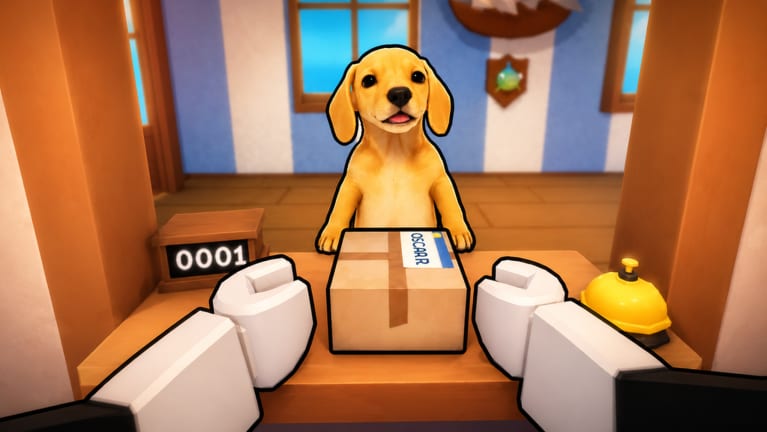
The customer counter is the heartbeat of Mail Simulator (Dog Mail) on Roblox. Every NPC you serve spawns coins, triggers new parcels for the sort floor, and keeps the island post office feeling alive. MEROYst designed the front desk as the spawn engine for the whole shift: ignore the queue and sorting tables starve, the ship leaves half-empty, and your hourly income collapses. This guide goes deeper than the counter section in Getting Started—queue psychology, order types, device-specific tips, and co-op handoffs so you never become the bottleneck.
Pair it with Controls for inputs and Co-op Roles when a friend owns the back room.
Why the counter pays more than it looks
Customers feel like a tutorial step, but experienced players treat them as throughput math:
- Each completed transaction drops base coins plus tips tied to speed.
- Many orders spawn packages on intake belts or tables—empty counter time means zero mail volume downstream.
- Some customers trigger express or priority mail that expires if sorting lags—serving fast buys your sorter breathing room.
- Combo streaks often start at the register; a abandoned prompt mid-dialogue can break shift multipliers.
Think of the counter as a faucet. Sorting and ship loading are pipes. Turn off the faucet and the pipes run dry.
Standard customer flow
Most MEROYst NPCs follow a predictable loop on place 80758549465719:
- Queue — avatar lines up at the Dog Mail desk or rope barrier.
- Prompt — interact icon or UI panel appears when you stand in the highlight zone.
- Request — pick up order, accept delivery job, pay fee, or confirm package type.
- Handoff — parcel appears on counter, belt, or your hands; customer walks away satisfied.
- Payout — coins pop with optional tip text; next NPC advances.
Early tutorial customers forgive slow clicks. After your first ship cycle, spawn rates increase—muscle memory from Controls matters.
Order types you will see
Mail Simulator mixes cozy flavor with logistics. Watch for these patterns:
| Order style | What you do | Downstream effect |
|---|---|---|
| Pickup | Hand pre-sorted parcel to NPC | Clears staging; no new sort work |
| Send / ship | Accept parcel for outbound route | Spawns labeled box for sort tables |
| Bulk batch | Multi-parcel icon on UI | Several boxes at once—call sorter early |
| Express | Timer or red marker on UI | Priority sort lane; missing it hurts bonuses |
| Co-op relay | Two-step UI (counter then runner) | Runner must be free—see co-op section |
When unsure, read the UI panel before clicking confirm. Wrong confirmations sometimes spawn mislabeled mail that costs more time to fix than the extra second at the register.
Queue management habits
Face the counter zone before interacting—Roblox hitboxes punish sideways approaches in crowded twenty-player servers.
Finish one customer completely before walking to sort unless your co-op contract says otherwise. Half-finished dialogs reset and waste spawn slots.
Watch line length, not mood role-play—if three NPCs wait, skip emote animations and use fastest valid clicks.
Listen for audio cues—some sims play a chime when spawn rate spikes; counter player should stay glued until chime ends.
Mobile players excel here: large tap targets beat mouse mis-clicks. Volunteer for counter in Co-op Roles if your party is mixed devices.
Patience and failure states
Many Roblox sims hide patience meters as face icons or color rings. MEROYst may tune these in patches—check Updates after August 2026 balance passes.
When patience expires:
- Payout drops or disappears entirely.
- Angry customers may block the queue slot briefly.
- Repeat failures on one shift can zero combo multipliers for that departure.
Recovery plan: clear remaining queue with simple orders first, announce “counter catching up” to sorter, defer express until line is two or fewer.
Co-op at the counter
With up to five friends, only one player should own primary register duty per wave:
- Counter main — all standard NPCs.
- Flex — grabs overflow when spawn double-stacks.
- Runner — only takes parcels that spawn on counter edge for immediate staging move.
Never have two mains clicking the same NPC—Roblox assigns loot to first input, second player wastes animation time.
In public lobbies, politely ask “counter?” before replacing someone mid-shift. If griefers block the desk, rejoin via Official Links.
Device-specific counter tips
PC — lower mouse sensitivity for UI buttons; bind mentally to “click confirm only after reading destination preview.”
Mobile — landscape mode; disable dynamic thumbstick if taps drift; zoom camera to see queue behind you.
Console — counter is viable; avoid fine UI menus if game supports hold-to-skip for repeat customers.
Counter mistakes that kill coin rate
- Abandoning queue to sort one box—sort backlog recovers slower than queue anger.
- Confirm spam — double-clicking can cancel orders on some Roblox UI skins.
- Blocking hitbox — standing in doorway prevents next NPC pathing.
- Ignoring express handoff — sorter learns late; express expires on table.
- Wrong-game habits from Mail Delivery Simulator—different UI, different place ID.
When to leave the counter
Switch jobs when:
- Spawn audio stops and line is empty.
- Sorter calls “intake critical” and flex cannot cover.
- Ship horn sounds—counter main becomes runner unless dock is staffed.
Do not leave because sorting looks fun—discipline wins Earn Coins Fast sessions.
After the counter: handoff checklist
Before walking away, verify:
- No glowing interact icons remain on desk.
- Belt intake visible on sort cam—not overflowing off mesh.
- Express flagged in chat or co-op board if spawned.
- Coins ticker updated—confirms last payout registered.
Then transition to How to Sort Packages or dock per Co-op Board assignment.
Related guides
- Getting Started — full shift overview
- How to Sort Packages — after mail spawns
- Play with Friends — invite friends to same counter shift
- Co-op Roles — who stays at desk
- Earn Coins Fast — monetize queue speed
Frequently Asked Questions
Quick answers about Mail Simulator sorting, ship loading, and co-op play.
Can one player handle the counter entire shift?
Solo players must alternate counter, sort, and dock. In co-op, dedicate one main counter role until spawn pauses so throughput stays maxed.
Why is my customer queue stuck?
Usually an unfinished dialog, a player blocking NPC pathing, or a desynced prompt—re-interact or rejoin the server via the official game link.
Do angry customers pay less?
Most Roblox sims reduce or zero payouts when patience expires. Serve the line before chasing optional sort tasks.
Should mobile players work the counter?
Yes—large tap targets often make mobile ideal for counter duty while PC players handle precise sort slots.